
E-Signature for Realtors, Right Next to Your CRM
Send your listing agreements, purchase contracts and addenda for signature without leaving your CRM. DealSign is included in Deal Sherpa Agent ($49/month), and you upload the forms you already use.
Send a listing agreement in four steps
| Step | What you do |
|---|---|
| 1. Upload | Add your own PDF: your state or brokerage listing agreement, purchase contract or addendum |
| 2. Place fields | Drop signature, initial and date fields where each signer needs them |
| 3. Send | Each signer gets their own secure link by email |
| 4. Track | See who has opened and signed, and who still owes a signature. Resend or void if plans change |
Use the forms you have
DealSign works with the PDFs you already use. Upload once, then save the forms you send often as templates.
Send from one login
The same login that holds your seller and buyer boards sends your documents, so there is no second app to open.
Keep a record
Every document keeps a timestamped history: when it was sent, first viewed, agreed to and signed, with the signer's IP address.
The CRM that follows up for you
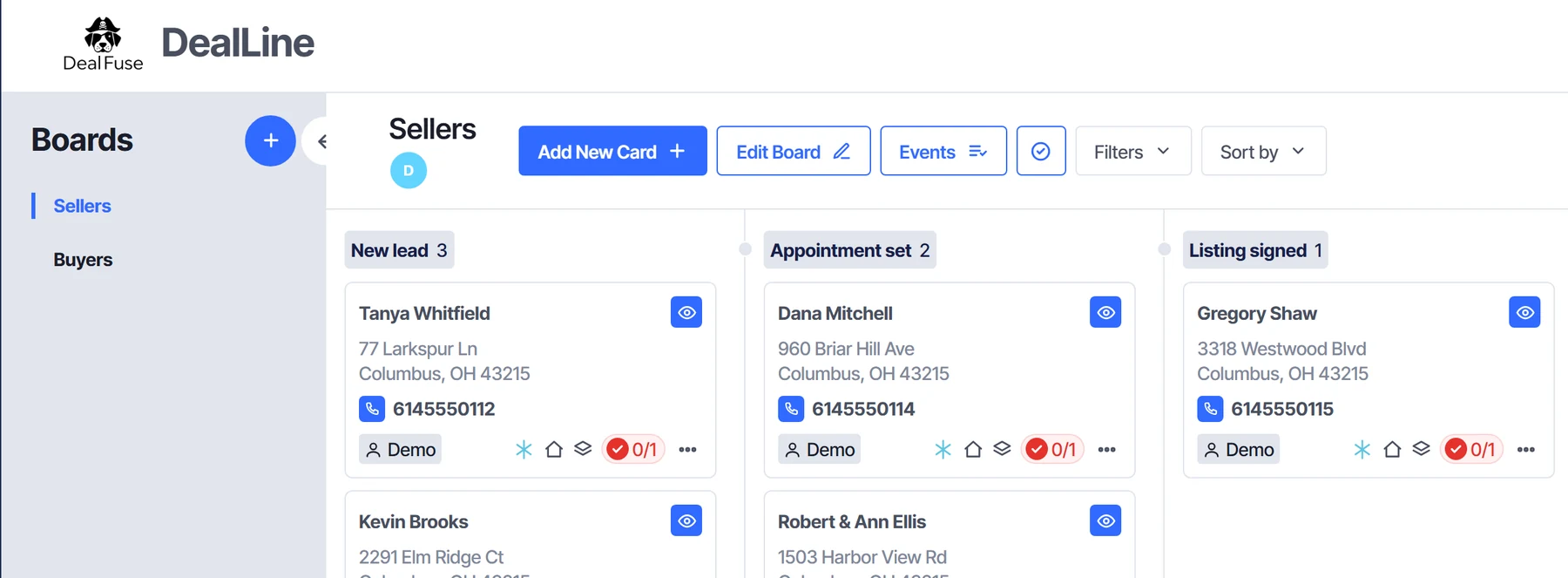
Sellers and buyers, each on their own board
Sellers move through New lead, Appointment set, Listing signed, Active, Under contract, Closed. Buyers move through New buyer, Showing, Offer out, Under contract, Closed. Drag a card when a deal moves and the board stays current.
Start free 7-day trial →Every follow-up scheduled for you
Move a card and its next to-do is booked. Actions shows what is overdue, due today and scheduled, split into calls, texts and emails, so you know who to reach first.
Start free 7-day trial →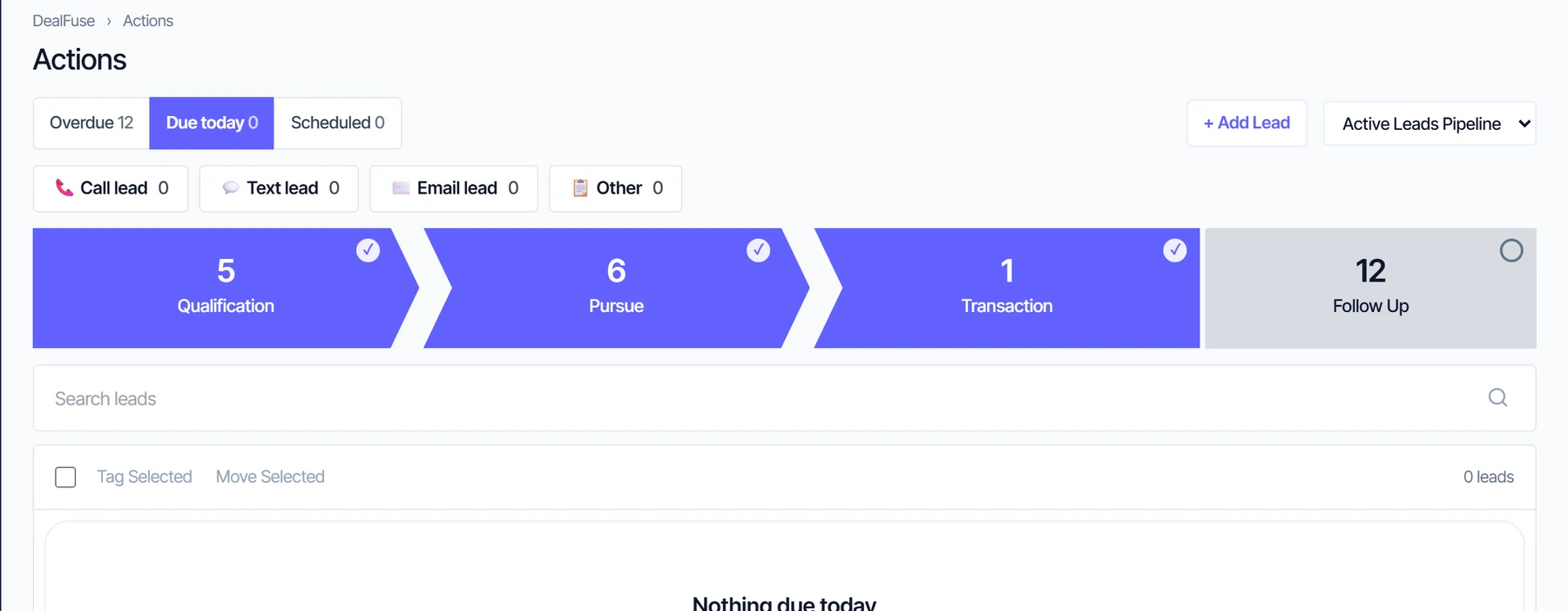
Everything about a client on one page
The stage, the next follow-up, phone numbers, notes and the activity history sit together, so you are never digging for the last conversation.
Start free 7-day trial →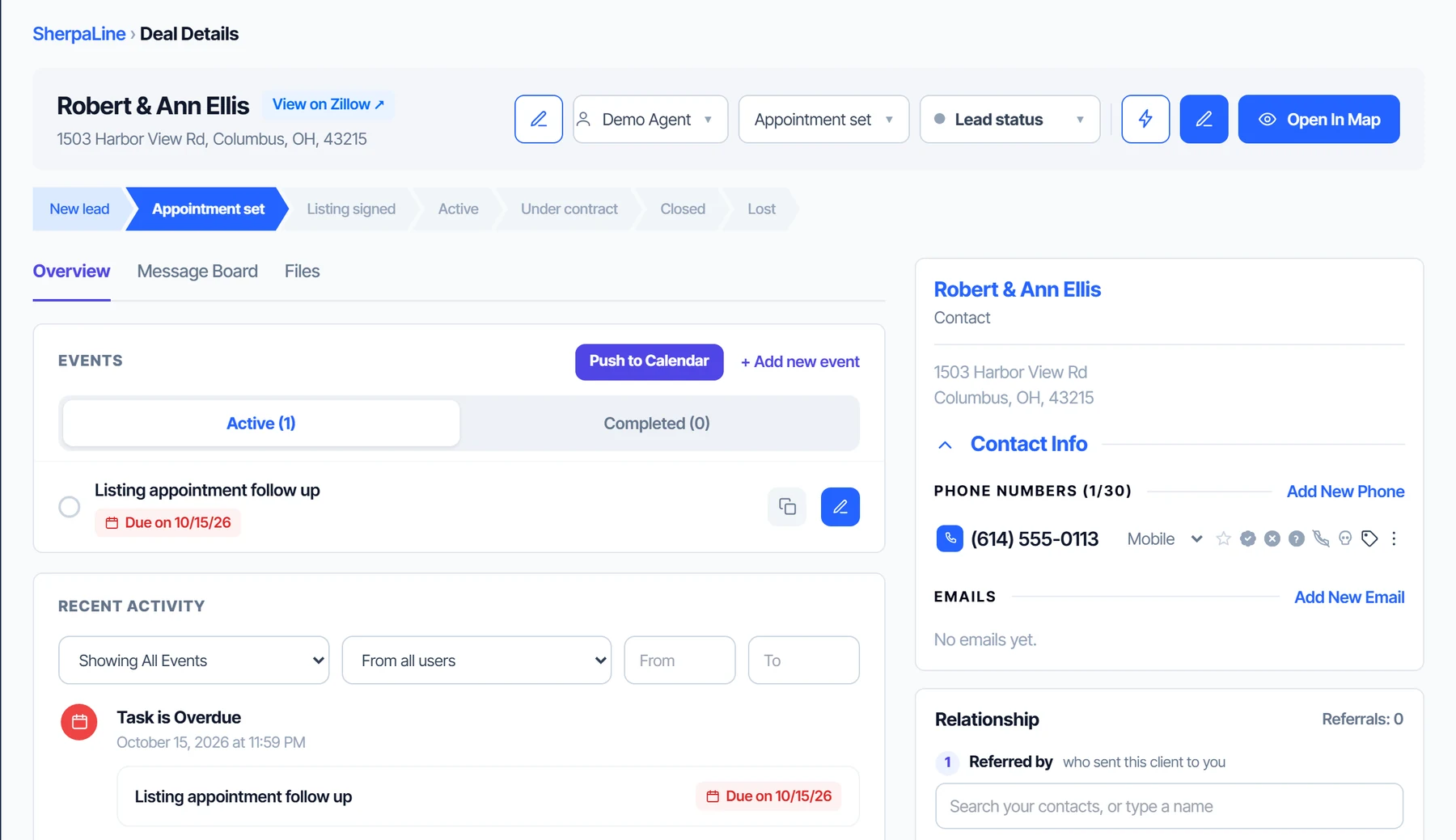
Email drips that run while you work
Starter plans like Speed to Lead, New Buyer and New Seller are ready to edit. Emails go out in your name, and a plan can start on its own when a lead reaches a stage.
Start free 7-day trial →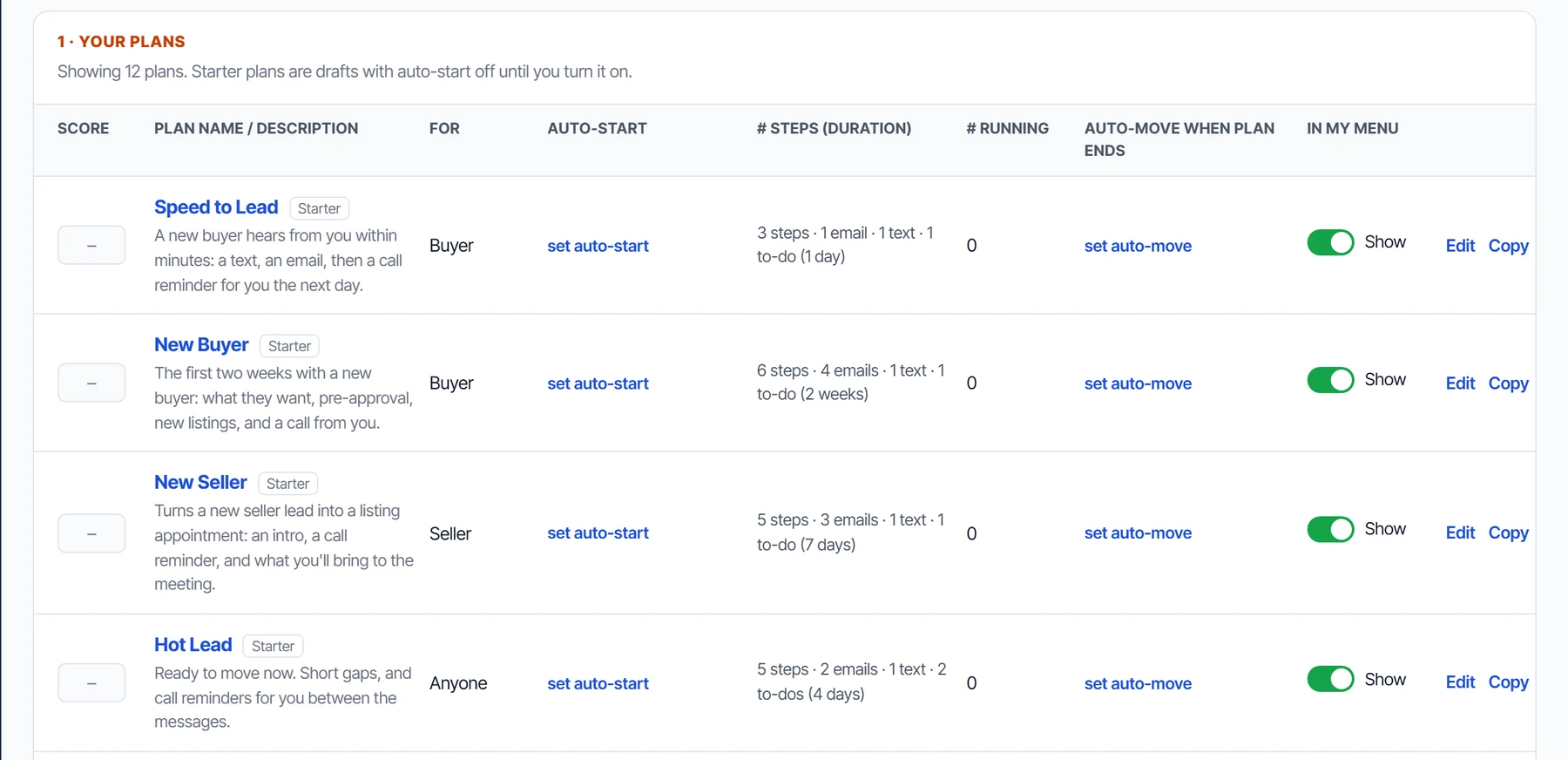
Bring your contacts with you
Export a CSV from your old CRM and upload it. Columns are matched by their names, tags, notes and to-do dates come along, and anything else is kept in a note.
Start free 7-day trial →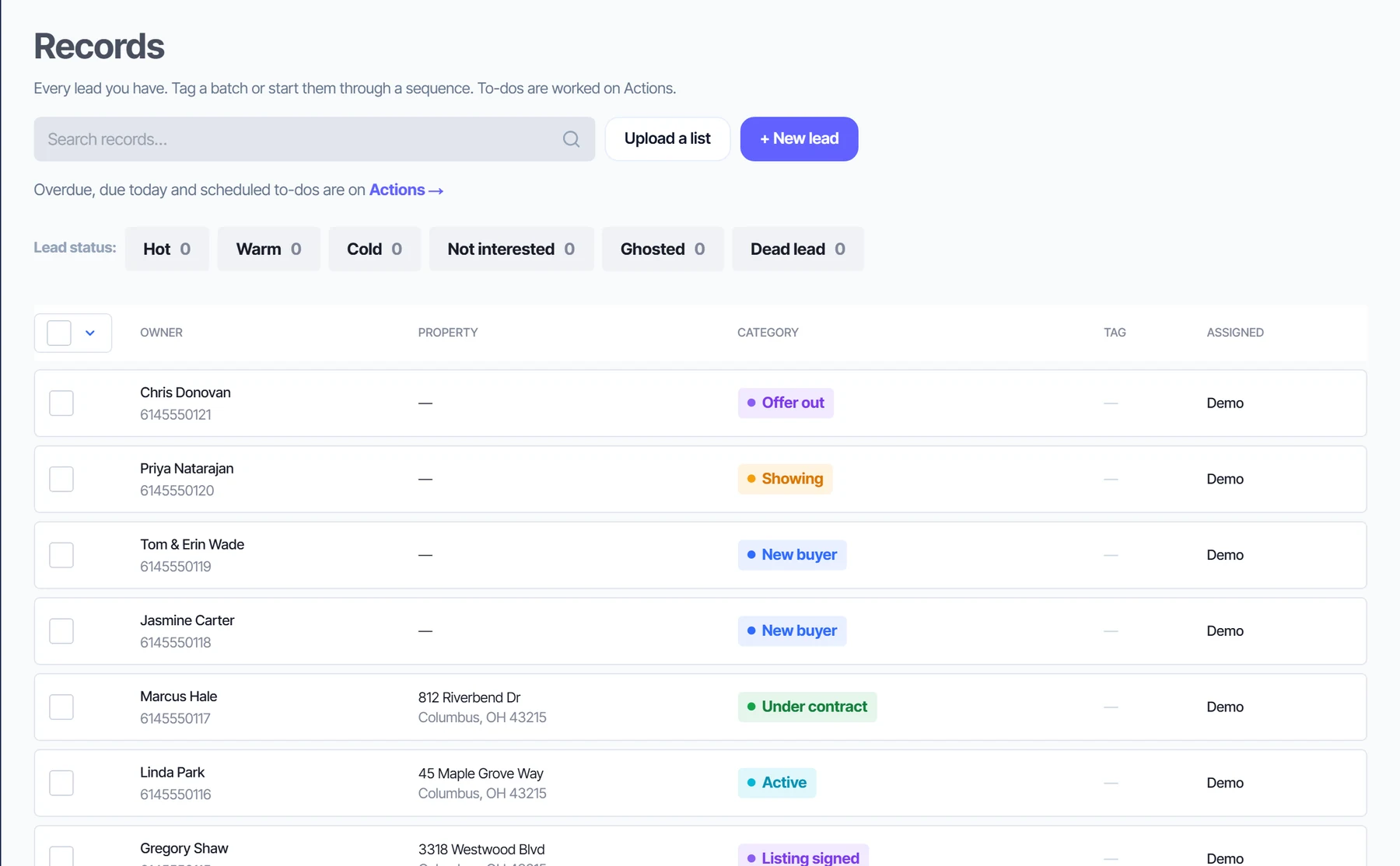
E-signatures for the documents agents send most
Most of an agent's paperwork is the same handful of documents: the listing agreement, the purchase contract, counteroffers and addenda. DealSign lets you upload those PDFs, mark where each person signs, initials and dates, and send them out in a few minutes.
Templates for the forms you reuse
Save a form with its fields already placed as a template. The next time you need it, start from the template instead of placing every field again.
Sign your own part too
If a document only needs your signature, sign it yourself in DealSign and keep the signed copy with the rest of your documents.
Know where every document stands
Your DealSign home shows what is waiting on you and what is waiting on others. Open a document to see who has viewed it and who has signed. If an email went to the wrong address or the terms changed, resend it or void it.
Security
Documents travel over HTTPS and are stored encrypted. Each signer has their own signing link, and only the sender and the people a document was sent to can open it. Read more on the DealSign security page. Check your state's and your brokerage's rules for which documents can be signed electronically.
Pricing
DealSign is included in Deal Sherpa Agent: $49/month or $470/year (save 20%), with the CRM, calendar and follow-ups. 7-day free trial, no card required. If you only want e-signatures, DealSign on its own is $9.99/month (14-day free trial, no card required). Every plan is on the pricing page.
Questions
Can I send my listing agreement for e-signature?
Yes. Upload your listing agreement as a PDF, place the signature, initial and date fields, and send it. Each signer gets their own link by email.
Does DealSign come with real estate forms?
You upload your own. Use the listing agreement and contracts your state or brokerage provides, and save the ones you use often as templates.
Is DealSign included with the agent CRM?
Yes. Deal Sherpa Agent is $49/month or $470/year (save 20%), and DealSign is part of it.
Can I use DealSign without the CRM?
Yes. DealSign on its own is $9.99/month. 14-day free trial, no card required.
Can I see when a client opens the document?
Yes. Each document shows who has viewed it and who has signed, and keeps a timestamped history of each step.
What if I sent it to the wrong person?
Void the document, or resend it once the details are fixed.
Your contracts, next to your clients
DealSign e-signatures, included with the CRM, calendar and follow-ups, for $49/month.
Start free 7-day trial